


Web Check-In for British Airways: Step-by-Step

Web check-in is going to be your best friend if you've ever stood in a long line at the airport and wished you had checked in earlier. You can confirm your flight, pick your seats, and get your boarding pass before you even leave home with British Airways' web check-in.
You know everything is ready when you get there, just like when you reserve a table at a restaurant online instead of walking in and hoping for the best.
There is a clear, step-by-step guide below, along with easy-to-understand examples to make the whole thing seem easy.
What Is Web Check-In?
Web check-in is the online version of the airport check-in desk. Instead of talking to an agent, you use the British Airways website or app to:
-
Confirm your presence on the flight
-
Select or change your seat
-
Receive a digital or printable boarding pass
Real-life example:
Imagine you’re flying from London to New York. The night before, you check in online from your sofa, choose an aisle seat, and save your boarding pass on your phone. At the airport, you skip the long check-in line and go straight to security.
When Does British Airways Web Check-In Open?
British Airways web check-in opens:
-
24 hours before departure for most flights
-
Up to 1 hour before departure (varies by airport)
This window gives you plenty of time to check in calmly rather than rushing at the airport.
Example:
Your flight departs at 10:00 AM on Friday. Web check-in opens at 10:00 AM on Thursday. Set a reminder, check in early, and lock in your preferred seat.
What You Need Before You Start
Before checking in online, keep these handy:
-
Booking reference (PNR) or ticket number
-
Passport (for international flights)
-
Internet access (phone, tablet, or computer)
Example:
Your booking reference looks like “ABC123.” Entering this correctly is like using the right key for the right lock—it opens your booking instantly.
Step-by-Step: How to Check In Online with British Airways
Step 1: Visit the British Airways Website or App
Go to the official British Airways website or open the mobile app. Look for the “Check in” option on the homepage.
Physical meaning example:
This step is like opening Google Maps before a road trip—you’re setting yourself up for a smooth journey.
Step 2: Enter Your Booking Details
You’ll be asked for:
-
Booking reference
-
Last name
Once entered, your flight details will appear on screen.
Example:
Type in your details, click “Find booking,” and your flight pops up just like pulling your reservation at a hotel front desk.
Step 3: Confirm Passenger Information
Check that your name, passport details, and flight information are correct. For international flights, you may need to enter passport data.
Example:
This is similar to double-checking your delivery address before placing an online order—small errors can cause big delays later.
Step 4: Choose or Change Your Seat
Depending on your ticket type:
-
Some seats are free
-
Others may have an extra charge
You’ll see a seat map showing window, middle, and aisle seats.
Example:
If you like stretching your legs, pick an aisle seat. It’s like choosing a corner seat in a cinema so you can get up without disturbing others.
Step 5: Add Extras (Optional)
You may be offered:
-
Extra baggage
-
Seat upgrades
-
Special meals
These can be added during check-in if available.
Example:
Adding an extra bag here is often cheaper than paying at the airport—similar to buying movie tickets online instead of at the door.
Step 6: Get Your Boarding Pass
Once check-in is complete, you can:
-
Download a mobile boarding pass
-
Email it to yourself
-
Print a paper copy
Example:
Saving your boarding pass on your phone is like having your house key in your pocket—you’re ready to go anytime.
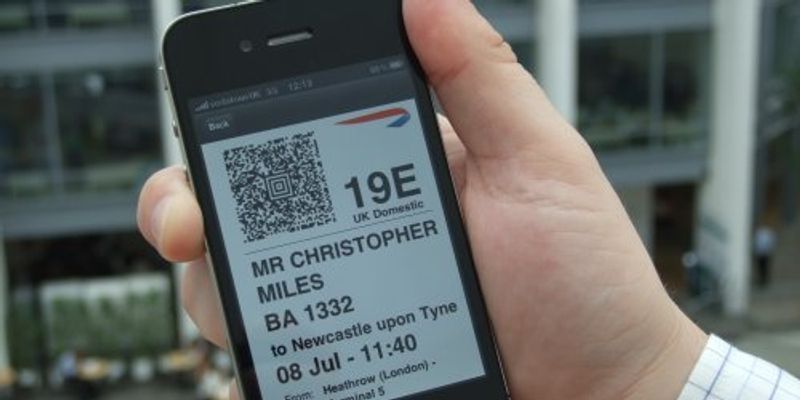


Using Your Boarding Pass at the Airport
At the airport, your boarding pass is used at:
-
Security checkpoints
-
Boarding gates
Simply scan the QR code from your phone or show the printed copy.
Example:
It works just like scanning a ticket at a concert entrance—quick beep, and you’re through.
Can You Check In Online with Bags?
Yes. If you have checked luggage:
-
Complete web check-in
-
Go to the bag drop counter at the airport
-
Drop your bags and head to security
Example:
Think of bag drop as returning a library book—you’ve already checked in; now you’re just handing something over.
Common Issues and Simple Fixes
Can’t Check In Online?
Possible reasons include:
-
Visa or document checks required
-
Special assistance requests
-
Certain international routes
Fix:
Arrive earlier and check in at the airport desk instead.
Boarding Pass Not Available?
Sometimes British Airways will ask you to collect it at the airport.
Fix:
Don’t panic—your check-in is still valid. Just visit a counter or kiosk.
Why Web Check-In Is Worth It
Web check-in saves:
-
Time – fewer queues
-
Stress – everything sorted in advance
-
Money – early access to cheaper extras
Everyday comparison:
It’s like packing your bag the night before instead of scrambling in the morning.
Web check-in for British Airways is designed to make flying simpler and smoother. By checking in online, you stay in control—choosing your seat, managing extras, and arriving at the airport ready to go.
If you treat web check-in as part of your travel routine, like charging your phone or setting an alarm, your airport experience becomes calmer and far more enjoyable.
Safe travels and smooth check-ins
Categories
- Lifestyle
- Motivation
- News & Trends
- AI
- Gadgets & Reviews
- Tech News
- Marketing
- Education
- Health & Fitness
- Travel
- Food & Cooking
- Entertainment
- Home & Living
- Sports
- Art
- Causes
- Crafts
- Dance
- Drinks
- Film
- Fitness
- Food
- Games
- Gardening
- Health
- Home
- Literature
- Music
- Networking
- Other
- Party
- Religion
- Shopping
- Sports
Read More
Daddyanna proudly delivers professional Cricket ID Guidance for users who value clarity and convenience. We remove confusion by presenting straightforward steps and dependable assistance. Our commitment lies in creating a secure and user-focused experience where obtaining a cricket ID feels effortless. By prioritizing trust and efficiency, daddyanna helps cricket enthusiasts confidently begin...

There's a crucial difference between social media management and social media marketing. Management focuses on presence—posting content, engaging audiences, building communities. Marketing focuses on outcomes—generating leads, driving sales, achieving measurable business results. Social Media Marketing Agency Gurgaon specialise in the latter. They develop campaigns designed to...

У сучасних умовах ведення бізнесу в Україні якість товару є головним фактором успіху. Проте навіть найкращий продукт потребує офіційного підтвердження своїх характеристик. Для виробників та імпортерів ключовим документом у цьому питанні стає сертифікат відповідності. Він є офіційним свідченням того, що продукція відповідає встановленим вимогам технічних регламентів, національних стандартів або...

Fashion today is more than just clothing it is a way of expressing personality, confidence, and mood. Among the modern brands redefining casual wear, Madhappy stands out as a label that blends premium quality with a powerful message of optimism and mental well-being. Known for its comfortable streetwear and uplifting philosophy, the brand has captured the attention of fashion lovers around the...

Stepping outside on a bright day feels refreshing, but constant exposure to sunlight brings long-term concerns for skin health. This is where sun protective clothing women are paying attention to becomes more than just a seasonal trend. It’s not only about avoiding sunburn; it’s about building a routine that quietly supports your well-being without adding complexity to your day....
